
Features: secure screeners, press kit pages and viewing data
Send the film with a private link. Share the press kit from the same workspace. Find out what happened after you pressed send.
Free plan. No credit card required.
Send a screener and keep a say in what happens to it
Upload your master once. FilmRelay prepares a viewing copy for you, and when it’s ready you create a link for each recipient. Every link has its own rules, so the one for a festival programmer can differ from the one for a critic or a buyer.
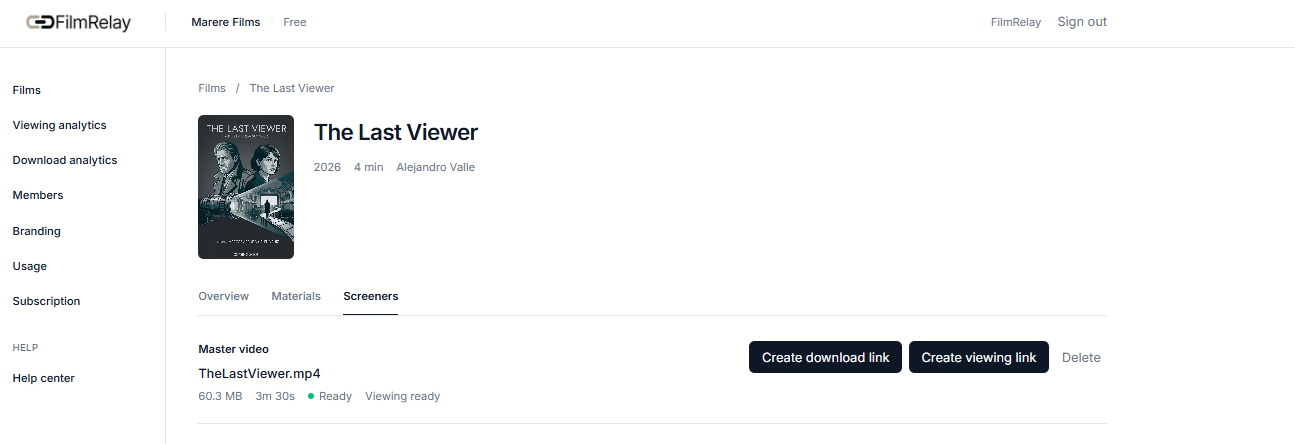
One link per recipient
Create each link with the recipient’s email address and, if it helps, their name and company. FilmRelay can email the link for you and send you a copy.
Password protection
Add a password if you want a second lock, and share it in a separate message. If the link lands in the wrong inbox, it still won’t open.
Expiry date and access limits
Choose the day a link stops working. You can also limit the number of viewing sessions and the number of IP addresses that can use it, so a link passed around an office stops working sooner. If you need to cut access earlier, revoke the link. Whoever opens it after that sees a page saying it has expired or is no longer available.
Watermark with your own text
A watermark is set up by default when you create a link. You can write whatever text you want and decide where it appears: centre, top right, top left and so on. Put the recipient’s name on the picture, and if a copy shows up where it shouldn’t, you know whose it was.
Watch in the browser, download only if you allow it
People watch in the browser. If a festival asks for the master, create a download link for it. Viewing links and download links are separate, so one doesn’t open the other. Your master is kept in up to 4K, and recipients watch a 1080p adaptive copy.
What a watermark can and can’t do
A watermark discourages sharing and helps you trace a leak. It doesn’t make copying impossible: anyone who can watch a film on a screen can film that screen. What you control is who gets a link, for how long and with what name on the picture.
Your recipient only has to press play
The link opens straight onto your film. There’s no account to create, no app to install and nothing to download. If you set a password, that’s the only extra step.
A programmer with sixty films to watch isn’t going to register somewhere to see yours. Every step you take off their side makes it more likely they watch.
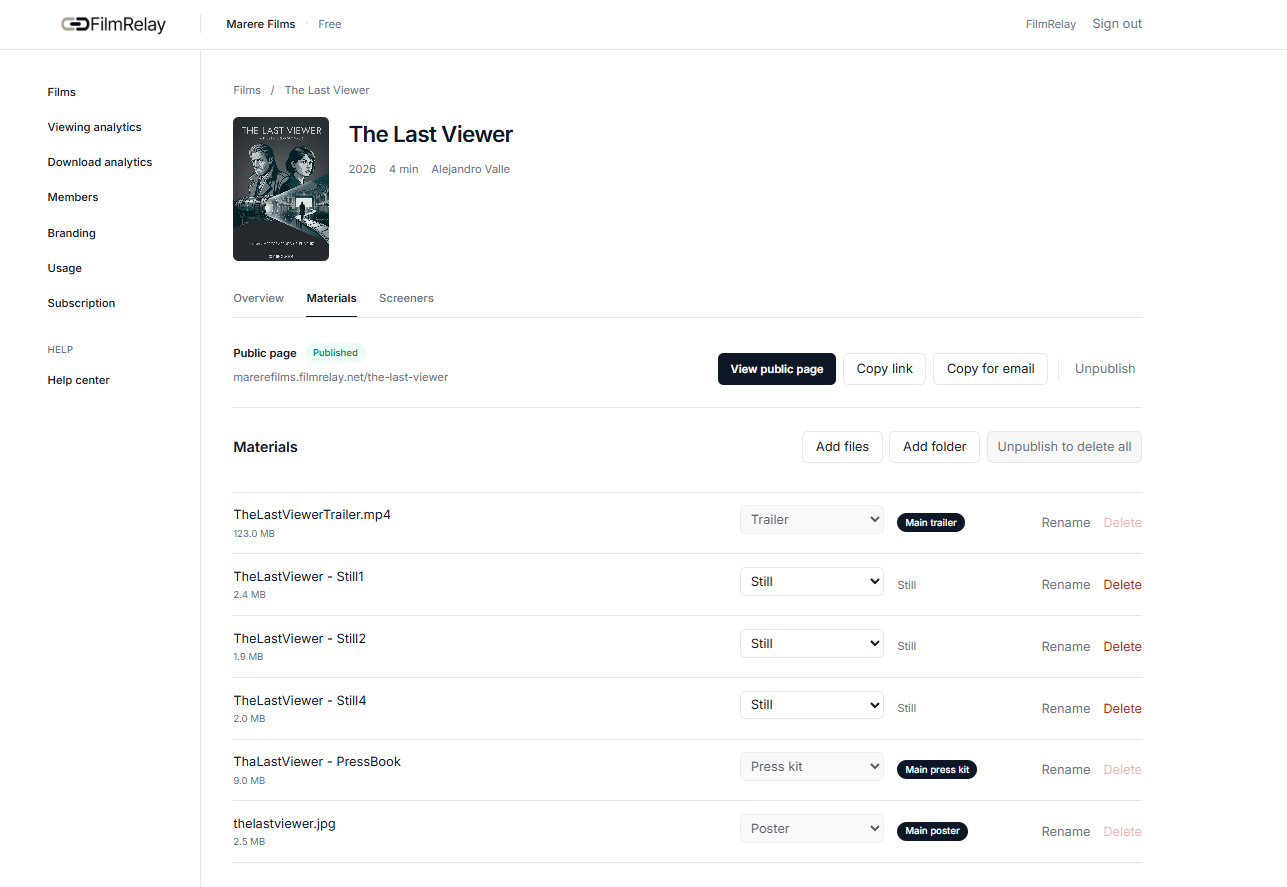
Keep the press kit with the film it belongs to
Posters in one folder, stills in another, the trailer on a different site and the synopsis in an email from March. FilmRelay keeps each title’s materials on one page, next to its screener.
What goes into a film’s press kit
Upload the assets that programmers, journalists and buyers ask for:
- Posters and artwork
- High-resolution film stills
- Press kits and documents
- Trailers and promotional video (an MP4 trailer can play on your film page; other video formats stay available as downloads)
- Any other file, organised by title
A public page for your film
Choose which assets to publish and FilmRelay builds one page for your film under your workspace address. You can turn the page on or off whenever you want. Send one link instead of five.
See an example film pageShare only what you choose
Anything you don’t publish stays private. Recipients see the assets you picked, and nothing else from your workspace.
Deliver your original files without a transfer service
A festival selects your film and asks for a file. Your export is huge and your inbox stops at a few megabytes.
Why email and transfer services fall short
Email attachments are too small for a master. Free transfer services cap the size, and their links either last forever or vanish when they decide. None of them tell you whether anyone downloaded the file.
A download link for your screener master
Create a download link from the screener itself. Give it a name, the recipient’s details, an expiry date and, if you like, a password and limits on the number of accesses and IP addresses. FilmRelay can email it for you.
Assets Delivery: store and send any original file
For everything else you deliver (masters, dailies and other original files), Assets Delivery gives you a private space in your workspace. Organise files in folders, then send a single file or a whole folder, which the recipient downloads as a ZIP. Each link has the same controls: password, expiry date, maximum accesses and maximum IP addresses.
Assets Delivery is an add-on you buy in 1 TB blocks, at $6, €6 or £6 per TB a month. It has its own storage, separate from your screener storage, so it doesn’t use up your viewing allowance.
See when it was downloaded
Download analytics shows, for each link, the number of IP addresses, the downloads and the latest activity.
One link per festival or venue
With a separate link for each, you can tell them apart in your activity and revoke one without touching the others.
See what happened after you pressed send
Sending a film and hearing nothing back is the worst part of festival season. Did they open it? Did they watch ten minutes or the whole thing? FilmRelay tells you for each link you create.
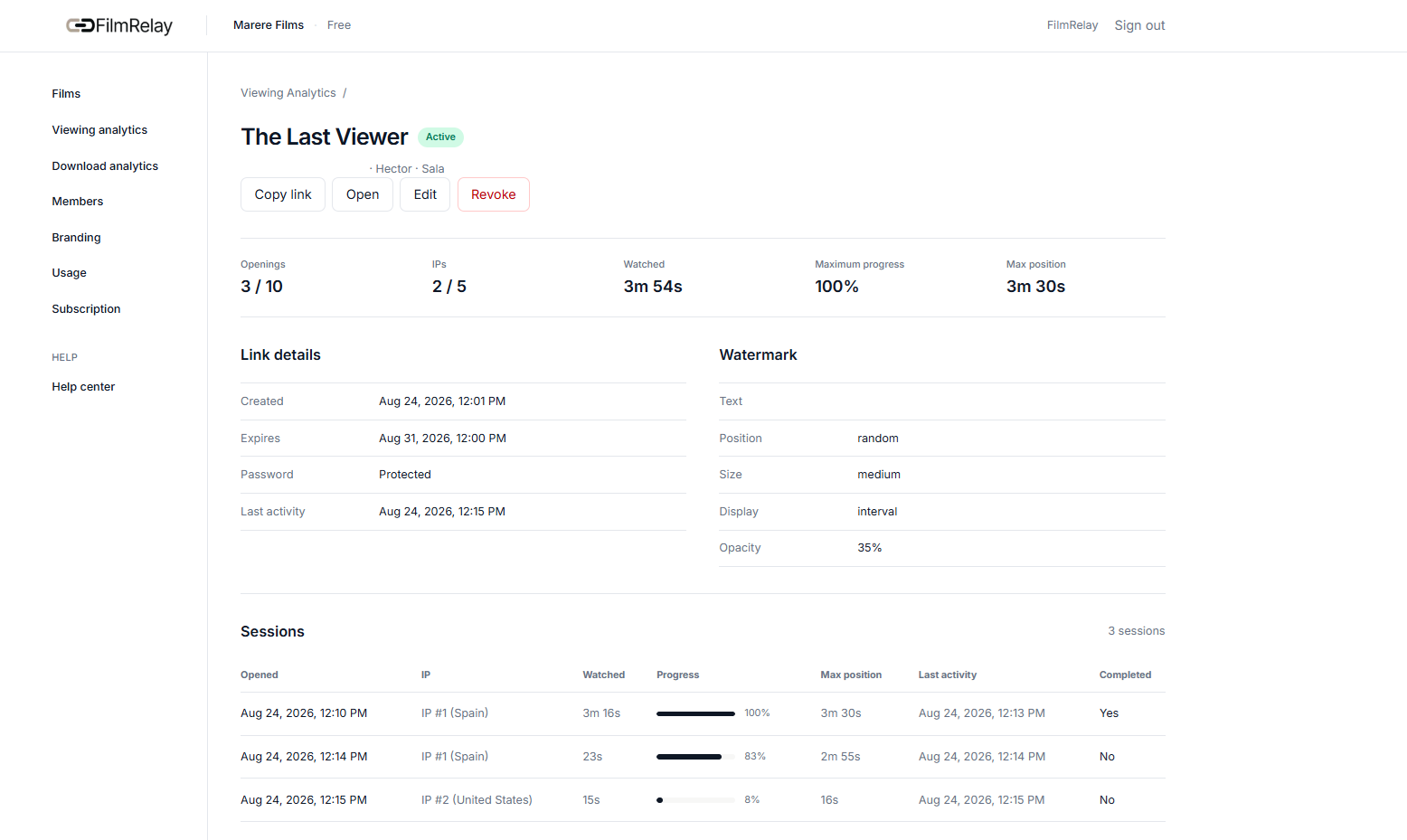
Viewing analytics
Open any viewing link to review its sessions. You see when it was accessed, how long the recipient watched, how far they got and whether they finished. Each session can show the IP address and, when available, the country.
Download analytics
Download links record the number of IP addresses, the downloads and the latest download activity, for screener masters and for Assets Delivery files alike.
Why one link per recipient
Each link is created for one recipient, so what happened on it is that recipient’s activity. FilmRelay shows the email, name and company you entered. It doesn’t verify who is actually watching: a forwarded link looks like the same recipient, and the IP address and country are what help you spot that.
How to read the numbers
A finished view means the recipient reached the end. A short view doesn’t prove they weren’t interested: people sample films, pause, come back the next day. Use the numbers as a reason to follow up, not as a verdict.
From data to a follow-up
Someone watched half and stopped: send a short note. Nobody opened the link in a week: resend it, or check the address. Everyone watched to the end: you have a good reason to write.
Present your films under your own name
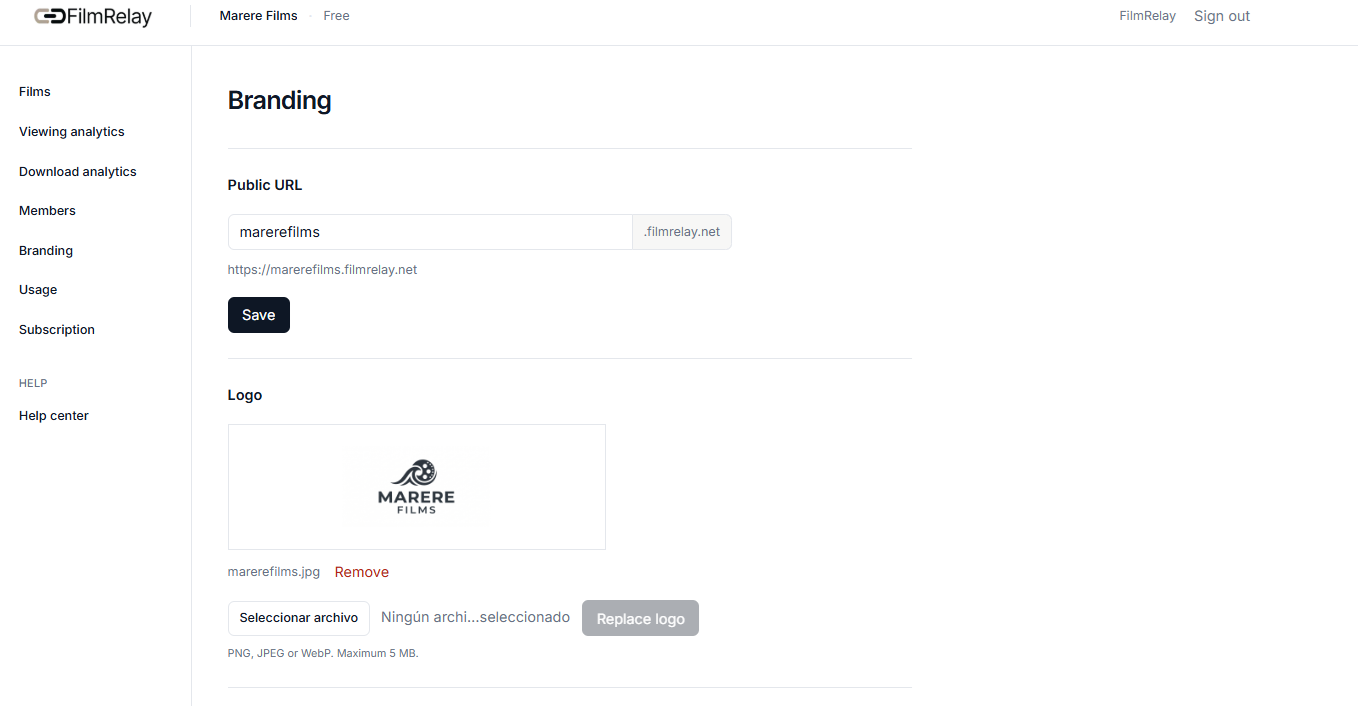
Add your organisation’s logo and your film pages live at a dedicated address in your workspace, like the example film page above, instead of on a generic platform. Custom branding is included in every paid plan.
- Your organisation logo
- A dedicated FilmRelay workspace
- A public address of your own, like yourcompany.filmrelay.net
- A professional page for each title
Pick what you need
| If you are | You’ll use most | Start here |
|---|---|---|
| A filmmaker sending a short or a feature to festivals | Private links, watermark, expiry, viewing analytics | Secure screeners |
| A distributor or production team with several titles | Film pages, workspace, one link per buyer | Film materials |
| A press agency | Screener and press kit on the same platform, who watched | Film materials |
Who can see your film, and for how long
You decide who gets a link, whether it needs a password, when it expires and how many sessions and IP addresses it allows. You can revoke a link at any time. Recipients don’t need an account, and you see the activity of each link you create.
FilmRelay or Drive, Dropbox, WeTransfer, Vimeo and YouTube?
Keep using them for what they do well: moving files between editors, hosting a public trailer. A screener is a different job. A shared link is the same for everyone who receives it, and it doesn’t tell you which of them watched.
Start free, upgrade when you need more films
Every paid plan has the same professional tools. Plans differ in capacity: how many films, how many stored and playback minutes, how many team members. Choose Materials for film pages, Screeners for secure links and analytics, or the Bundle for both at a lower combined price.
Start free with one film and Materials, 100 stored video minutes and 125 playback minutes a month. Watermarking and viewing analytics are included on the free plan too. Paid plans start at $6, €5 or £5 a month, and you can switch the currency on the pricing page.
Frequently asked questions
Do my recipients need an account?
No. They need the link, and the password if you set one.
What does the recipient see?
Your film, ready to play from the link, with your watermark on it. If you allow downloads, they can download it too.
Can someone screen-record my film?
A watermark makes a copy traceable and discourages it, but it can't stop someone from filming a screen. Give each recipient their own link so you know whose copy it was.
How long does a screener link last?
As long as you decide. Set an expiry date on each link, or revoke it yourself at any time.
Can I limit how many times a link opens?
Yes. For each link you can set a maximum number of viewing sessions and a maximum number of IP addresses.
Can I see who watched?
You see the activity of each link: sessions, watch time and completion, with the IP address and country when available. Each link is created for one recipient, so you know whose link it was. FilmRelay doesn't verify the person behind the screen.
Can I send my master file to a festival?
Yes. Create a download link from the screener, or store the file in Assets Delivery and send the file or its folder. Give the link an expiry date and see when it's downloaded.
What is Assets Delivery?
An add-on that stores your original files and folders in your workspace and lets you send them through protected download links. You buy storage in 1 TB blocks, and it's separate from your screener storage.
Can I put my press kit on a public page?
Yes. Choose which assets to publish, and publish or unpublish the page whenever you want. Anything you don't publish stays private.
Is there a free plan?
Yes: one film with Materials, 100 stored video minutes and 125 playback minutes a month, with watermarking and viewing analytics included. No credit card required.
Who is FilmRelay not for?
FilmRelay is built for independent films, small distributors and agencies that want to send a film and see what happened. If you need a studio-scale security certification or a press-room suite with newsletters, a larger platform will fit better.
Your next screener can go out with its press kit
Upload the film, add the materials and send your first screener link. See what happened.